
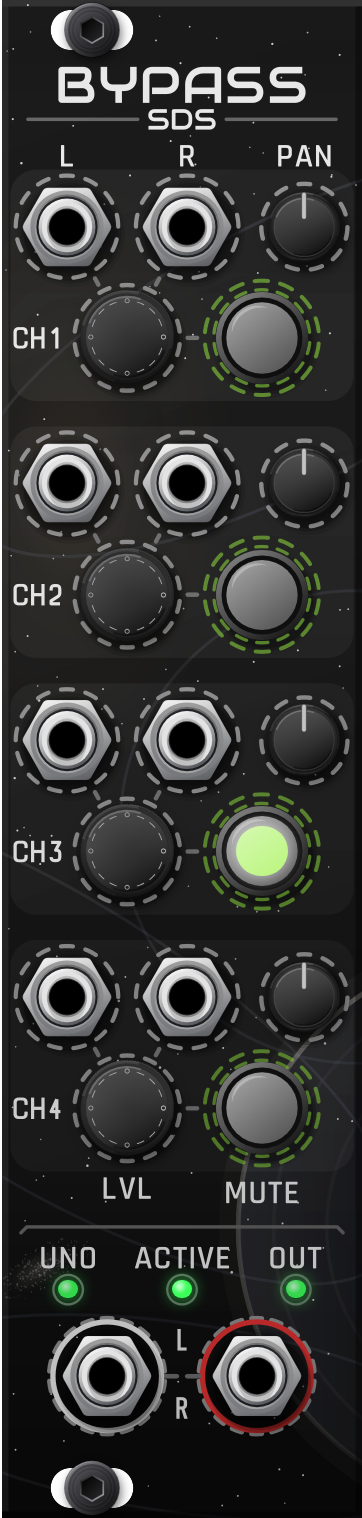
Orbital manual · 6 HP
Orbital Bypass
The final stereo output of an Orbital patch. It takes Uno’s finished mix through the link, with no cables, and adds four stereo channels for sounds that don’t need to move: a kick, a bass line, a reverb return.
Connecting
Place Bypass in the Orbital chain. Uno’s own L/R jacks then go inactive automatically with a short fade, and their tooltip says the output has moved to Bypass. Remove Bypass and they come back. Nothing plays twice and nothing drops out.
With no Uno nearby, Bypass works as a plain four-channel stereo mixer.
Channels 1–4
| Control | What it does |
|---|---|
| L / R in | Patch only L for mono to both sides. R alone plays on the right only. |
| PAN | Pan / balance for the channel. |
| LVL | Channel level, from off to +6 dB. The default is 0 dB. |
| MUTE | Click-free mute. The button lights when the channel is muted. |
Output and lights
- L / R out: Uno plus channels 1–4. There is no master knob. Send it straight to your audio output; effects after it can ruin the 3D image (see Keep the output clean).
- ACTIVE: Bypass is the live output point.
- UNO and OUT level lights work like Uno’s: green = signal, yellow above 8 V, red above 10 V. Bypass doesn’t limit, so if OUT turns red, turn something down.